
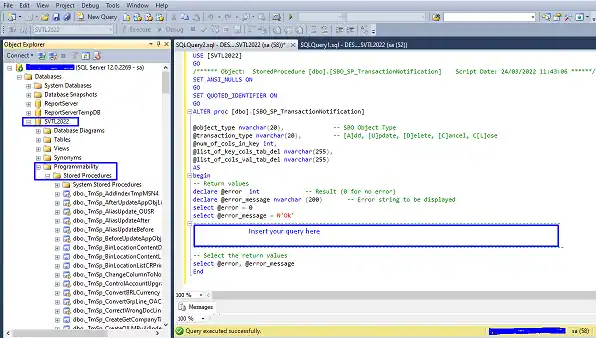
When posting a Goods Receipt PO (GRPO) in SAP Business One, users can receive more quantity than the quantity on the purchase order. To block GRPO quantity that exceeds the purchase order, add the query below to the SBO_SP_TransactionNotification stored procedure. The system will stop the posting and show an error message to warn the user.
Why block GRPO quantity above the purchase order?
Receiving more than you ordered inflates stock, creates supplier invoice mismatches and makes the three-way match between purchase order, goods receipt and invoice harder. Blocking over-receipts keeps purchasing and inventory records accurate.
How to add the query
- Log in to Microsoft SQL Server Management Studio.
- Expand Databases.
- Expand your company database (in this example, SVTL2022).
- Expand Programmability.
- Expand Stored Procedures.
- Scroll down to dbo.SBO_SP_TransactionNotification, right-click it and select Modify.
- Paste the query in the section marked “Insert your query here”.
- Click Execute to save the procedure.
Tip: Test every change to SBO_SP_TransactionNotification in a test company database first, and keep a copy of the original procedure before you modify it.
Query to block GRPO quantity greater than the purchase order
IF @transaction_type IN (N'A', N'U') AND (@Object_type = N'20')
BEGIN
    IF EXISTS (
        SELECT T0.BaseEntry, SUM(T0.Quantity)
        FROM [dbo].[PDN1] T0
        INNER JOIN [dbo].[POR1] T1 ON T1.DocEntry = T0.BaseEntry
        WHERE T0.BaseType = 22
          AND T0.ItemCode = T1.ItemCode
          AND T0.BaseLine = T1.LineNum
          AND T0.DocEntry = @list_of_cols_val_tab_del
        GROUP BY T0.BaseEntry
        HAVING (SUM(T0.Quantity) > SUM(T1.Quantity)) OR SUM(T0.Quantity) > SUM(T0.BaseOpnQty)
    )
    BEGIN
        SELECT @error = 10, @error_message = 'GRPO quantity is greater than PO quantity'
    END
END
How the query works
- It runs when a GRPO (object type 20) is added or updated.
- It matches each GRPO line (PDN1) to its base purchase order line (POR1, base type 22).
- If the received quantity is greater than the ordered quantity or the open quantity, the GRPO is blocked.
Related SAP Business One queries
See also how to block delivery quantity above the sales order and how to block invoice quantity above the sales order.