
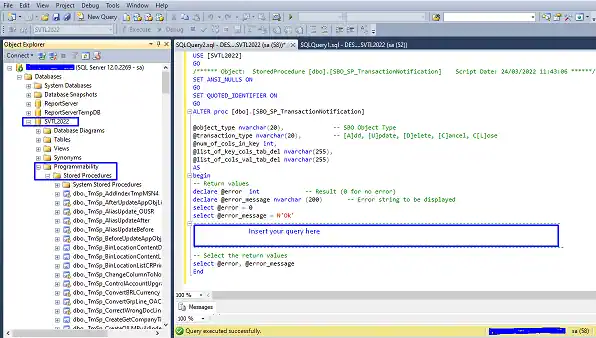
When posting an A/R invoice in SAP Business One, users can enter more quantity than the quantity on the sales order. To block invoice quantity that exceeds the sales order, add the query below to the SBO_SP_TransactionNotification stored procedure. The system will then stop the posting and show an error message to warn the user.
Why block invoice quantity above the sales order?
Invoicing more than the customer ordered leads to disputes, delayed payments and credit notes. It can also distort your sales reports and stock figures. Validating the quantity at posting time keeps invoices in line with what was agreed.
How to add the query
- Log in to Microsoft SQL Server Management Studio.
- Expand Databases.
- Expand your company database (in this example, SVTL2022).
- Expand Programmability.
- Expand Stored Procedures.
- Scroll down to dbo.SBO_SP_TransactionNotification, right-click it and select Modify.
- Paste the query in the section marked “Insert your query here”.
- Click Execute to save the procedure.
Tip: Test every change to SBO_SP_TransactionNotification in a test company database first, and keep a copy of the original procedure before you modify it.
Query to block invoice quantity greater than the sales order
IF @transaction_type IN (N'A', N'U') AND (@Object_type = N'13')
BEGIN
    DECLARE @invoice int

    SELECT @invoice = (LineNum + 1)
    FROM INV1
    WHERE INV1.DocEntry = @list_of_cols_val_tab_del
      AND ((Quantity > BaseOpnQty) AND (INV1.ItemCode != 'LMF100451'))
    ORDER BY LineNum ASC

    IF (NOT ISNULL(@invoice, 0) = 0)
    BEGIN
        SET @error = 10
        SET @error_message = N'Invoiced quantity cannot exceed Sales order quantity ' + CONVERT(nvarchar(4), @invoice) + N' !'
    END
END
How the query works
- It runs when an A/R invoice (object type 13) is added or updated.
- It compares the quantity on each invoice line (INV1) with the open quantity on the base document line (BaseOpnQty).
- The item code LMF100451 is excluded as an example of an item you may allow above the order quantity. Replace it with your own item code, or remove that condition to check every item.
- If any line is higher, the invoice is blocked and the error message shows the line number.
Related SAP Business One queries
See also how to block delivery quantity above the sales order and how to block GRPO quantity above the purchase order.