
Incomplete business partner records cause problems later, from invoices sent without an email address to deliveries with no postal address. In SAP Business One you can enforce mandatory business partner fields by adding validation queries to the SBO_SP_TransactionNotification stored procedure. Users who create or update a business partner must then fill in the required information before SAP Business One will save the record.
Why use mandatory business partner fields?
Complete customer and supplier data keeps statements, reminders, deliveries and reports accurate. Instead of relying on users to remember every field, the system checks the record and shows a clear message that tells the user which tab and field to complete.
How to add the queries
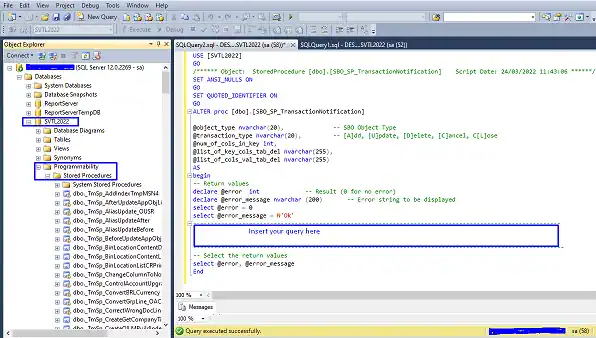
- Log in to Microsoft SQL Server Management Studio.
- Expand Databases.
- Expand your company database (in this example, SVTL2022).
- Expand Programmability.
- Expand Stored Procedures.
- Scroll down to dbo.SBO_SP_TransactionNotification, right-click it and select Modify.
- Paste the query in the section marked “Insert your query here”.
- Click Execute to save the procedure.
Tip: Test every change to SBO_SP_TransactionNotification in a test company database first, and keep a copy of the original procedure before you modify it.
Queries for mandatory business partner fields
Each block below is independent. Add only the checks your business needs.
Require a mobile number
IF @object_type = '2' AND @transaction_type IN ('A','U')
BEGIN
    IF EXISTS (
        SELECT T0.CardCode FROM OCRD T0
        WHERE T0.CardCode = @list_of_cols_val_tab_del AND T0.[Cellular] IS NULL
    )
    BEGIN
        SET @error = 1
        SET @error_message = 'On the General TAB Please Enter the Business Partner Mobile Number on the Mobile Phone Field!!'
    END
END
Require an email address
IF @object_type = '2' AND @transaction_type IN ('A','U')
BEGIN
    IF EXISTS (
        SELECT T0.CardCode FROM OCRD T0
        WHERE T0.CardCode = @list_of_cols_val_tab_del AND T0.[E_Mail] IS NULL
    )
    BEGIN
        SET @error = 1
        SET @error_message = 'On the General TAB Please Enter the Business Partner Email Address on the Email Field!!'
    END
END
Require a telephone number
IF @object_type = '2' AND @transaction_type IN ('A','U')
BEGIN
    IF EXISTS (
        SELECT T0.CardCode FROM OCRD T0
        WHERE T0.CardCode = @list_of_cols_val_tab_del AND T0.[Phone1] IS NULL
    )
    BEGIN
        SET @error = 1
        SET @error_message = 'On the General TAB Please Enter the Business Partner Telephone Number on the Tel1 & Tel2 Field!!'
    END
END
Require a postal address
IF @object_type = '2' AND @transaction_type IN ('A','U')
BEGIN
    IF EXISTS (
        SELECT T0.CardCode FROM OCRD T0
        INNER JOIN CRD1 T1 ON T0.[CardCode] = T1.[CardCode]
        WHERE T0.CardCode = @list_of_cols_val_tab_del AND T1.[Street] IS NULL
    )
    BEGIN
        SET @error = 1
        SET @error_message = 'On the Addresses TAB Please Enter the Business partner Postal Address on the Postal Address Field!!'
    END
END
Require a location (city)
IF @object_type = '2' AND @transaction_type IN ('A','U')
BEGIN
    IF EXISTS (
        SELECT T0.CardCode FROM OCRD T0
        INNER JOIN CRD1 T1 ON T0.[CardCode] = T1.[CardCode]
        WHERE T0.CardCode = @list_of_cols_val_tab_del AND T1.[City] IS NULL
    )
    BEGIN
        SET @error = 1
        SET @error_message = 'On the Addresses TAB Please Enter the Business partner Location on the City Field!!'
    END
END
Require an address ID
IF @object_type = '2' AND @transaction_type IN ('A','U')
BEGIN
    IF EXISTS (
        SELECT T0.CardCode FROM OCRD T0
        LEFT JOIN CRD1 T1 ON T0.[CardCode] = T1.[CardCode]
        WHERE T0.CardCode = @list_of_cols_val_tab_del AND ISNULL(T1.[Address],'') = ''
    )
    BEGIN
        SET @error = 1
        SET @error_message = 'On the Addresses TAB Please Enter the Address ID As Address ID'
    END
END
Require contact person details
IF @object_type = '2' AND @transaction_type IN ('A','U')
BEGIN
    IF EXISTS (
        SELECT T0.CardCode FROM OCRD T0
        LEFT JOIN OCPR T1 ON T0.[CardCode] = T1.[CardCode]
        WHERE T0.CardCode = @list_of_cols_val_tab_del AND ISNULL(T1.FirstName,'') = ''
    )
    BEGIN
        SET @error = 1
        SET @error_message = 'On the Contact Person TAB Please Enter the Contact Person Contact ID, First & Middle Names'
    END
END
Require the contact person email address
IF @object_type = '2' AND @transaction_type IN ('A','U')
BEGIN
    IF EXISTS (
        SELECT T0.CardCode FROM OCRD T0
        LEFT JOIN OCPR T1 ON T0.[CardCode] = T1.[CardCode]
        WHERE T0.CardCode = @list_of_cols_val_tab_del AND ISNULL(T1.E_MailL,'') = ''
    )
    BEGIN
        SET @error = 1
        SET @error_message = 'On Contact Person TAB Please Enter the Contact Person Email Address'
    END
END
Require the Statements email group
IF @object_type = '2' AND @transaction_type IN ('A','U')
BEGIN
    IF EXISTS (
        SELECT T0.CardCode FROM OCRD T0
        LEFT JOIN OCPR T1 ON T0.[CardCode] = T1.[CardCode]
        WHERE T0.CardCode = @list_of_cols_val_tab_del AND T1.EmlGrpCode != 'Statements'
    )
    BEGIN
        SET @error = 1
        SET @error_message = 'On the Contact Person TAB Please Select Statements on the E-mail Group Field'
    END
END
How the queries work
- Each check runs when a business partner (object type 2) is added or updated.
- It looks for the empty field in the business partner master data (OCRD), addresses (CRD1) or contact persons (OCPR).
- If the field is empty, the record is not saved and the user sees the error message.
Related SAP Business One queries
You can use the same method on documents. See how to link a sales order to an incoming payment or how to block delivery quantity above the sales order.