
Some business processes require customers to pay in advance. In SAP Business One you can link sales order to incoming payment so that every advance payment received through the Incoming Payments module, whether by bank transfer, credit card or any other means, is tied to the sales order it pays for. This stops users from creating a sales order with an amount greater or less than the amount received.
Step 1: Create a UDF to link sales order to incoming payment
Create a user-defined field (UDF) on the sales order document, for example U_ReceiptNo. When creating the sales order, the user enters the incoming payment document number in this field.
Make the U_ReceiptNo field mandatory so a sales order cannot be saved without it. You can do this with an extra check in SBO_SP_TransactionNotification, using the same method shown in our guide on mandatory business partner fields.
Step 2: Add the query to the stored procedure
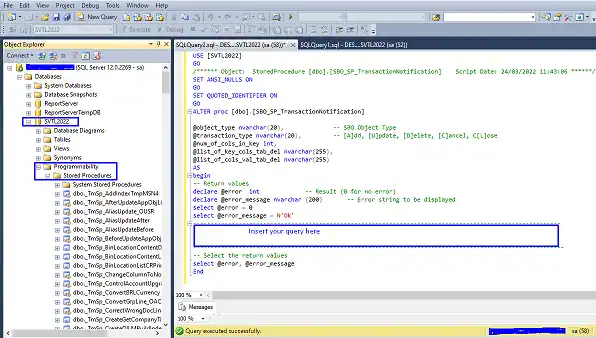
- Log in to Microsoft SQL Server Management Studio.
- Expand Databases.
- Expand your company database (in this example, SVTL2022).
- Expand Programmability.
- Expand Stored Procedures.
- Scroll down to dbo.SBO_SP_TransactionNotification, right-click it and select Modify.
- Paste the query in the section marked “Insert your query here”.
- Click Execute to save the procedure.
Tip: Test every change to SBO_SP_TransactionNotification in a test company database first, and keep a copy of the original procedure before you modify it.
Query to block a sales order if the order amount is not equal to the receipt amount
IF (@object_type = '17') AND (@transaction_type IN (N'A', N'U'))
BEGIN
    IF EXISTS (
        SELECT T0.DocEntry
        FROM ORDR T0
        INNER JOIN ORCT T1 ON T0.[U_ReceiptNo] = T1.[DocNum]
        WHERE T0.DocEntry = @list_of_cols_val_tab_del
          AND (T0.[DocTotal] <> T1.[DocTotal])
    )
    BEGIN
        SELECT @error = -1, @error_message = N'Receipt Amount must be equal to sales order Amount'
    END
END
How the query works
- It runs when a sales order (object type 17) is added or updated.
- It finds the incoming payment (ORCT) whose document number matches the U_ReceiptNo field on the sales order (ORDR).
- If the sales order total is different from the payment total, the sales order is blocked with the message “Receipt Amount must be equal to sales order Amount”.
Related SAP Business One queries
See also how to block delivery quantity above the sales order and how to block invoice quantity above the sales order.